Your coding agent can ship a feature in an afternoon. It can't help with the thing that decides whether anyone finds the app: the store listing, the keywords, the reviews, the ads.
That isn't because the work is hard for an agent. It's because the work lives in dashboards, and an agent can't read a dashboard.
We built Appeeky Spec to move that work into the repo. This is how it works. The examples below come from the example repo that ships with it, a sleep sounds app two months in. Its numbers are made up; the files and the output are what the tool writes.
Where a listing change goes to die
Think about the last time you changed your app's subtitle.
You typed it into App Store Connect. The reason was in your head. Two weeks later, did anyone check whether it worked? If ranks went up, was that the subtitle, or did the whole store move that week?
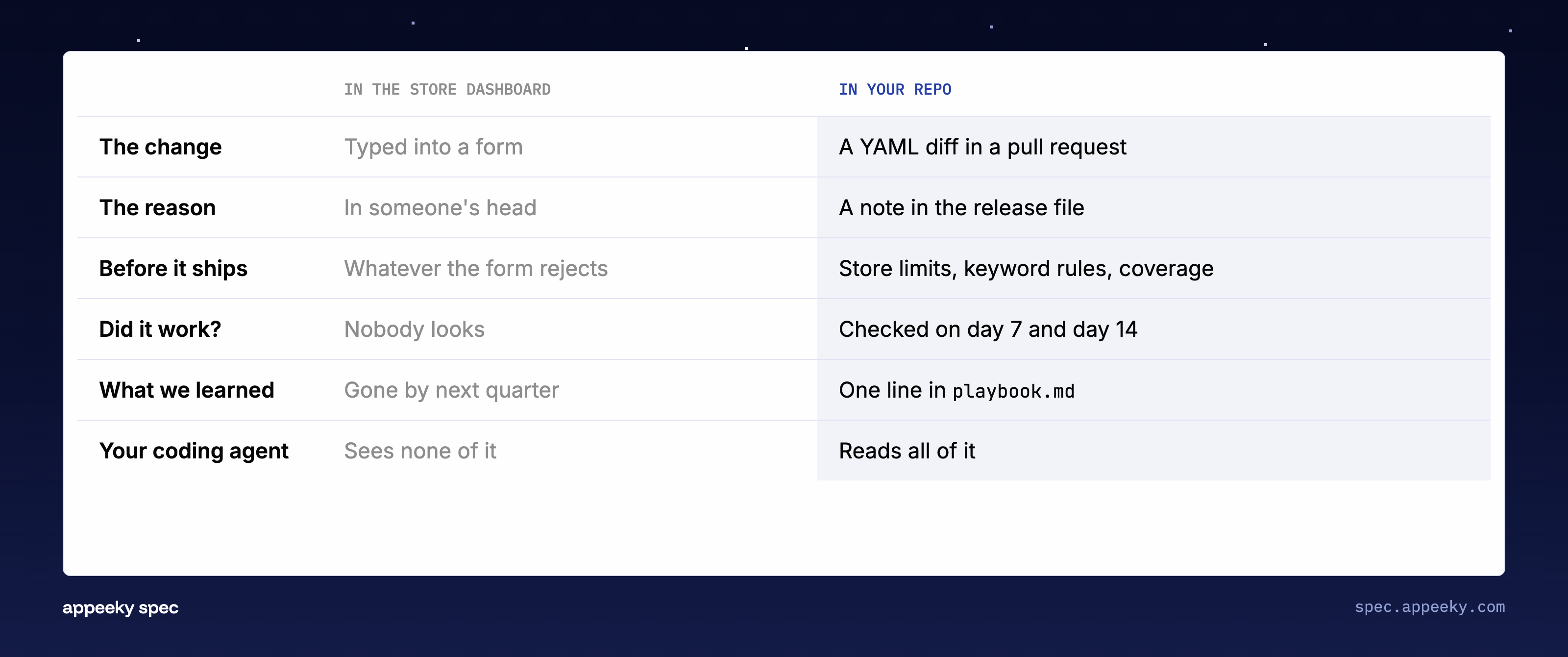
Most teams run growth this way, and it has the same problem code had before version control: no record, no review, no way back. It also means an agent has nothing to work with. It can't see what the listing says today, what was tried before, or what happened after.
The growth loop, as a folder
Appeeky Spec puts all of it in one folder of your repo, as plain files.
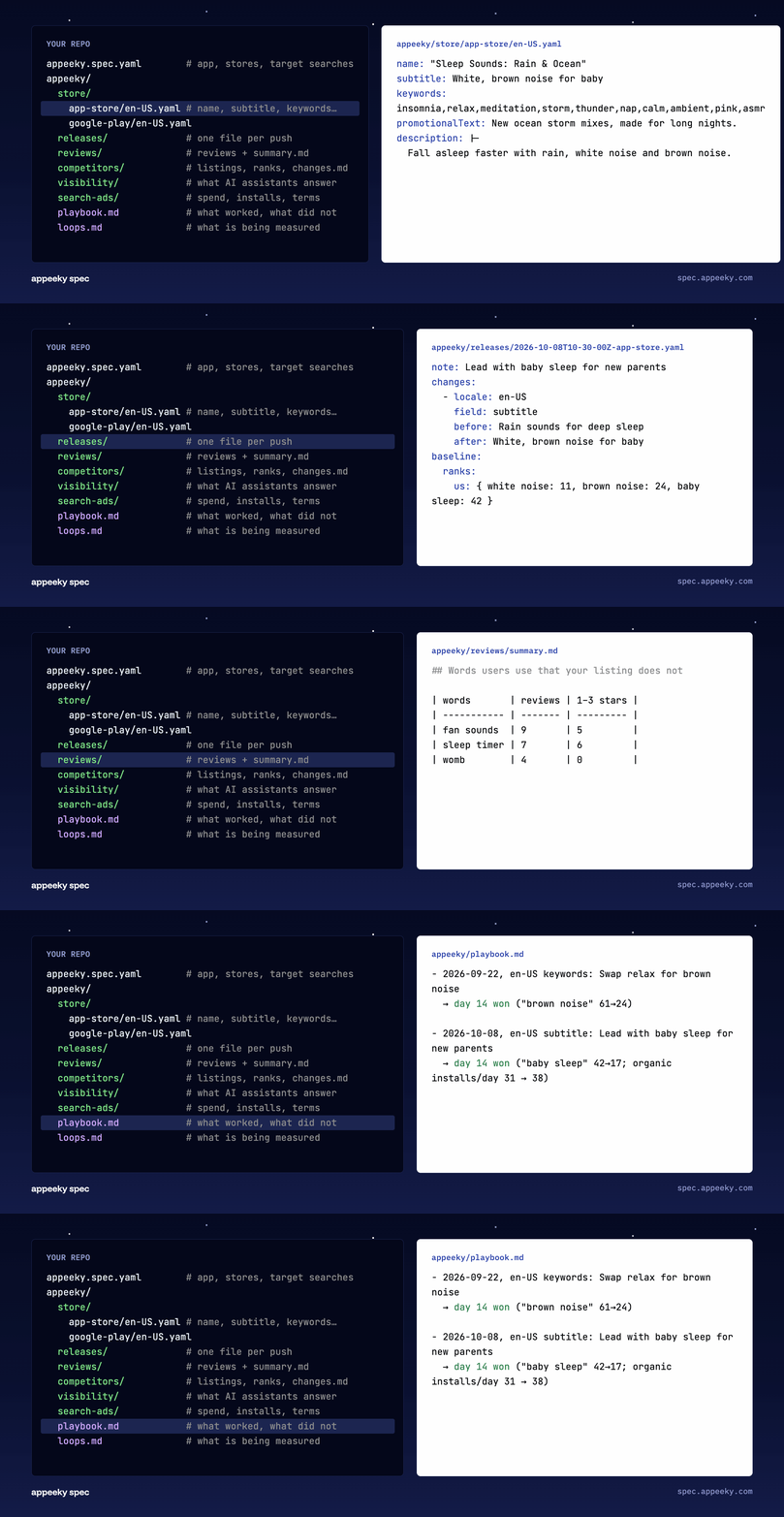
The listing is YAML, one file per store and locale. appeeky.spec.yaml lists the searches the app should be found for, per country. Around those sit the things you need to decide the next change: reviews, competitors, what AI assistants answer when people ask for an app like yours, ad spend, and a file for every past release.
One command sets it up:
npx @appeeky/spec initIt finds your app, pulls the live listing from App Store Connect and Google Play, and suggests targets from what the app already ranks for.
Once it's files, everything a coding agent is good at applies. It can read the whole state, change one line, and show you a diff.
A change goes through a pull request
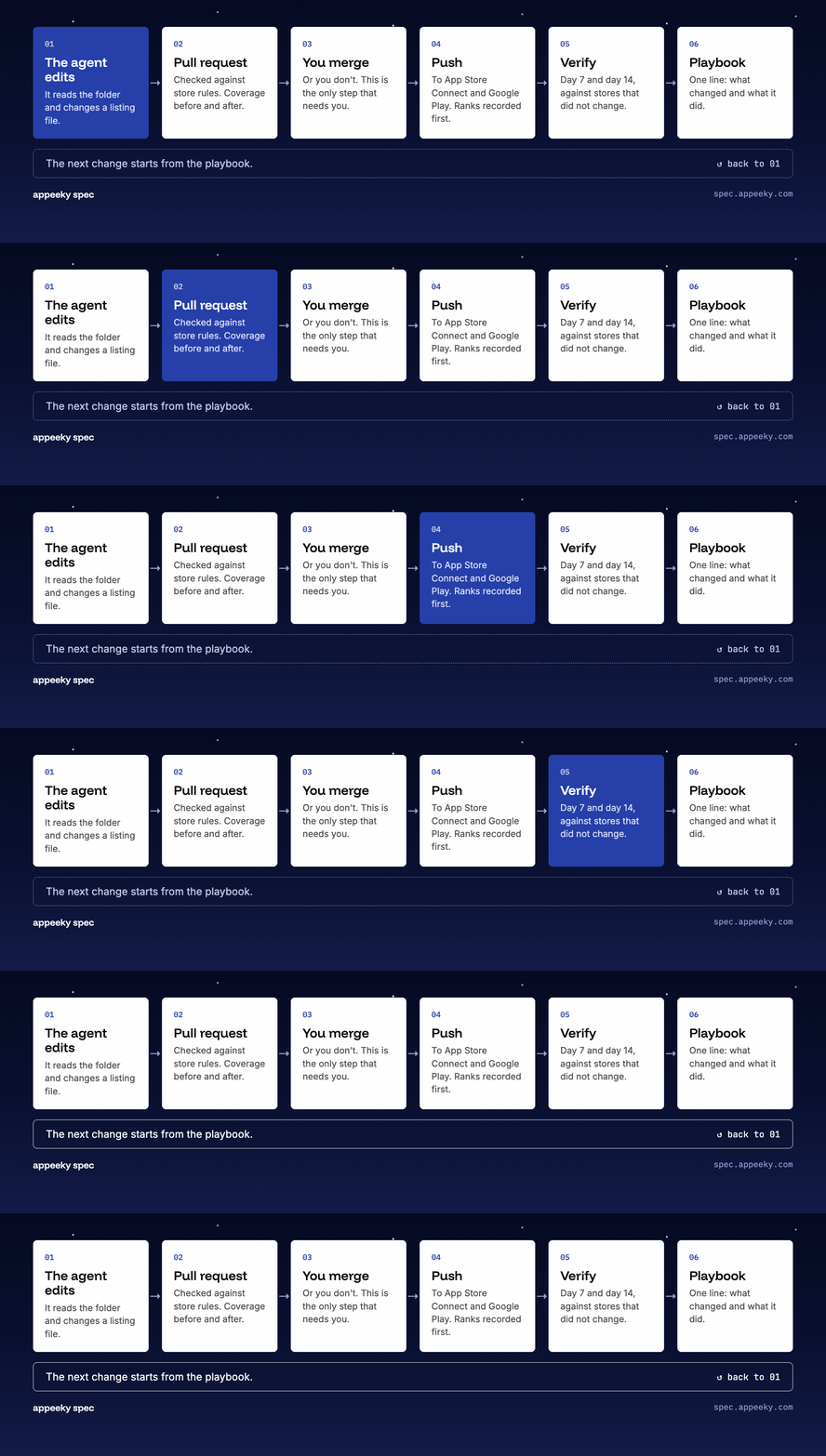
The agent edits a listing file and opens a pull request. CI runs two things on it.
check knows the store rules: character limits, Google Play's title policy, screenshot sizes. It also knows the ASO rules people forget, like a keyword field that repeats a word already in the name, or 56 characters of keyword space left unused.
coverage says which of your target searches each storefront can find you for, before and after the change.
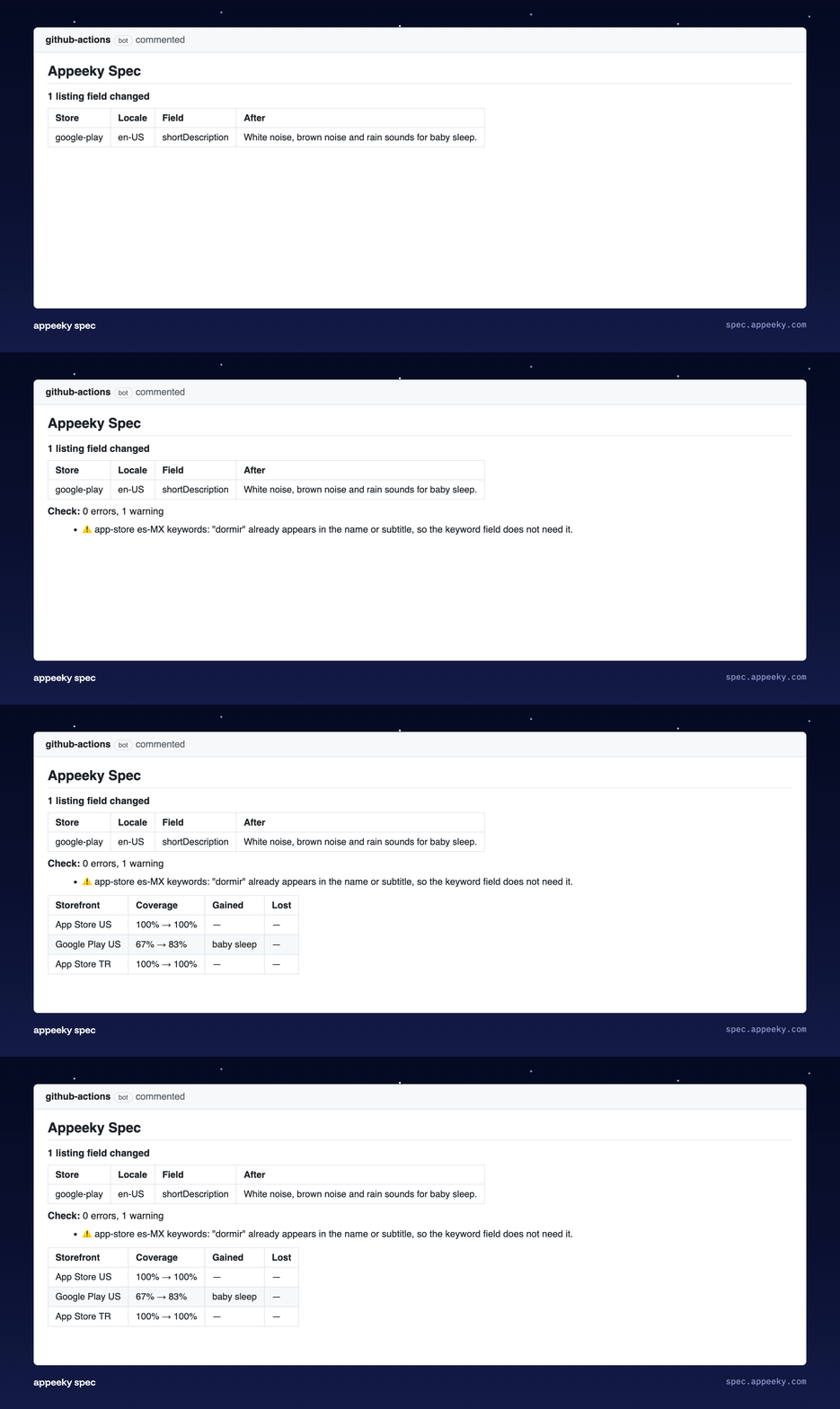
In this one, the agent added "baby sleep" to the Google Play short description. Coverage in the US went from 67% to 83%, and the report names the search it gained.
Then you merge, or you don't. Nothing reaches the stores until a person merges. The merge is the approval, and it's the only step that needs you.
On merge, the change is pushed to App Store Connect and Google Play. Right before it pushes, the tool records the search rank of every target, and writes a release file: what changed, where, and why.
Did it work?
This is the step almost nobody does by hand. On day 7 and day 14 after a push, verify checks the ranks again and writes a verdict into the release.
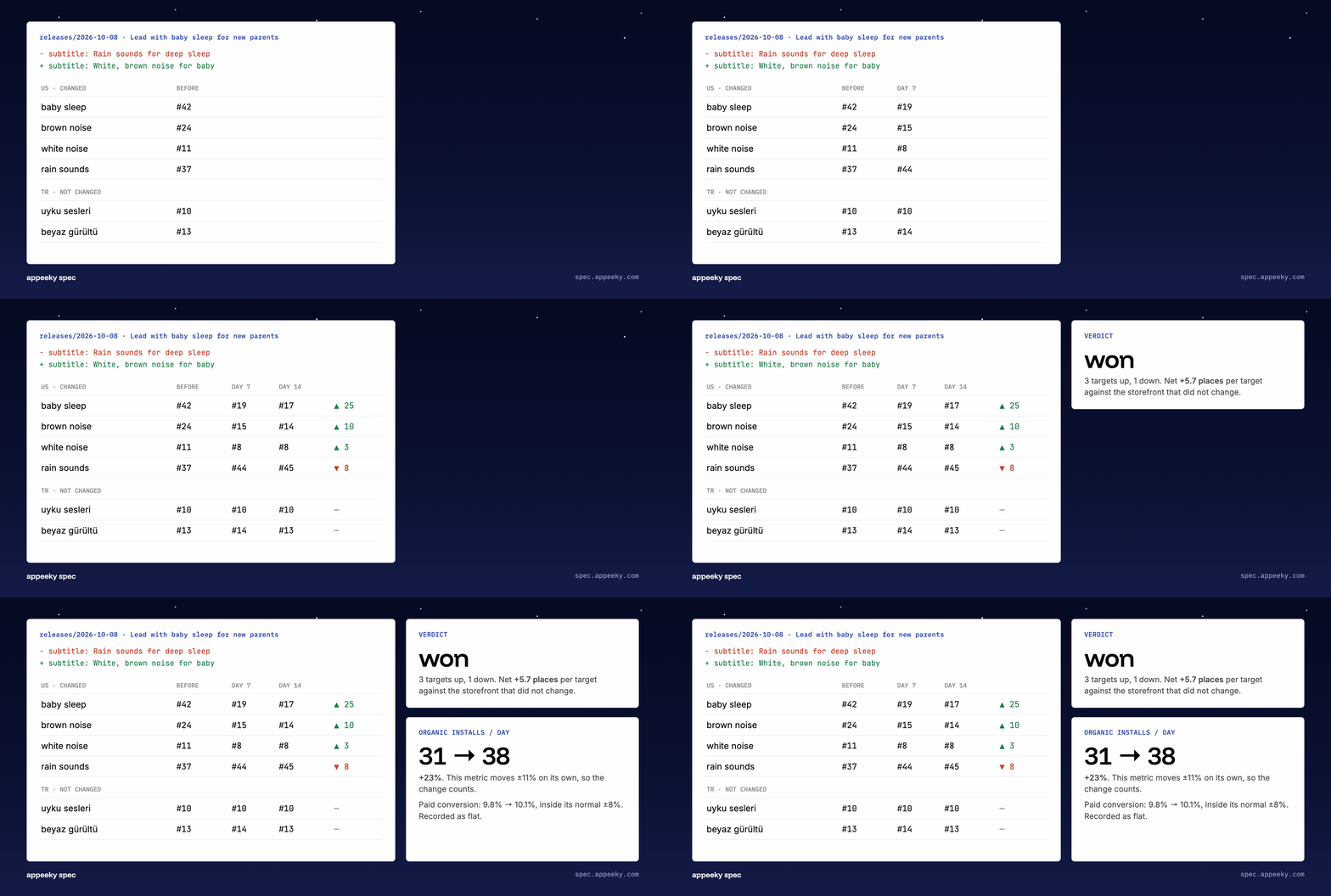
Two things keep the verdict honest.
A control group. Ranks move on their own: the store's algorithm, the season, a competitor's update. So storefronts the release did not change are measured over the same days. Here the US listing changed and the Turkish one didn't. The US targets gained 5.7 places more than the Turkish ones, so the gain is credited to the change. If both had moved the same, the verdict would be "mixed": the store moved, not the listing.
Normal moves. Before comparing installs or revenue, it reads the weeks before the push and learns how much each metric moves by itself. Organic installs went up 23%, against a normal swing of 11%, so that counts. Paid conversion moved 3%, inside its normal 8%, so it's recorded as flat.
A release that loses badly gets a different suggestion: revert, which puts the old values back.
The playbook
Every verdict becomes one line in appeeky/playbook.md.
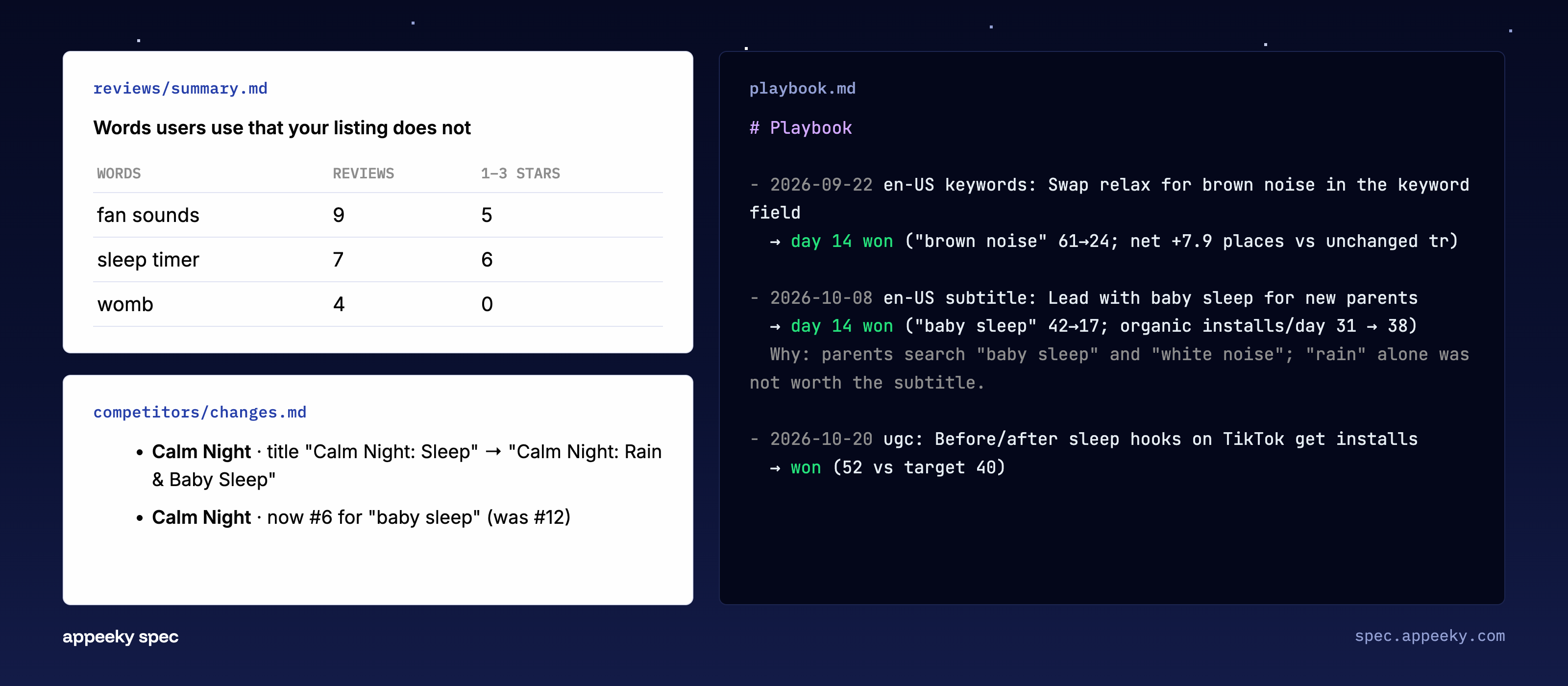
This file is the reason the loop gets better over time. An agent starts every session with no memory. The playbook is the memory: "leading with baby sleep worked, and here is why." The next proposal starts from it, and the review prompt tells the agent never to repeat a change the playbook says lost.
The other files give it reasons. reviews/summary.md lists words users write that appear nowhere in your listing. In the example, nine reviews mention "fan sounds". That's either a search to target or a feature to build. competitors/changes.md says a rival just put "Baby Sleep" in its title and climbed to #6 for it.
Each of those is a line in a text file, which is exactly what an agent reads well.
Found in AI answers, and on Google
People don't only search the store anymore. They ask ChatGPT, Claude, Gemini and Perplexity for "an app that plays rain sounds", and they search Google. Both are in the folder too.
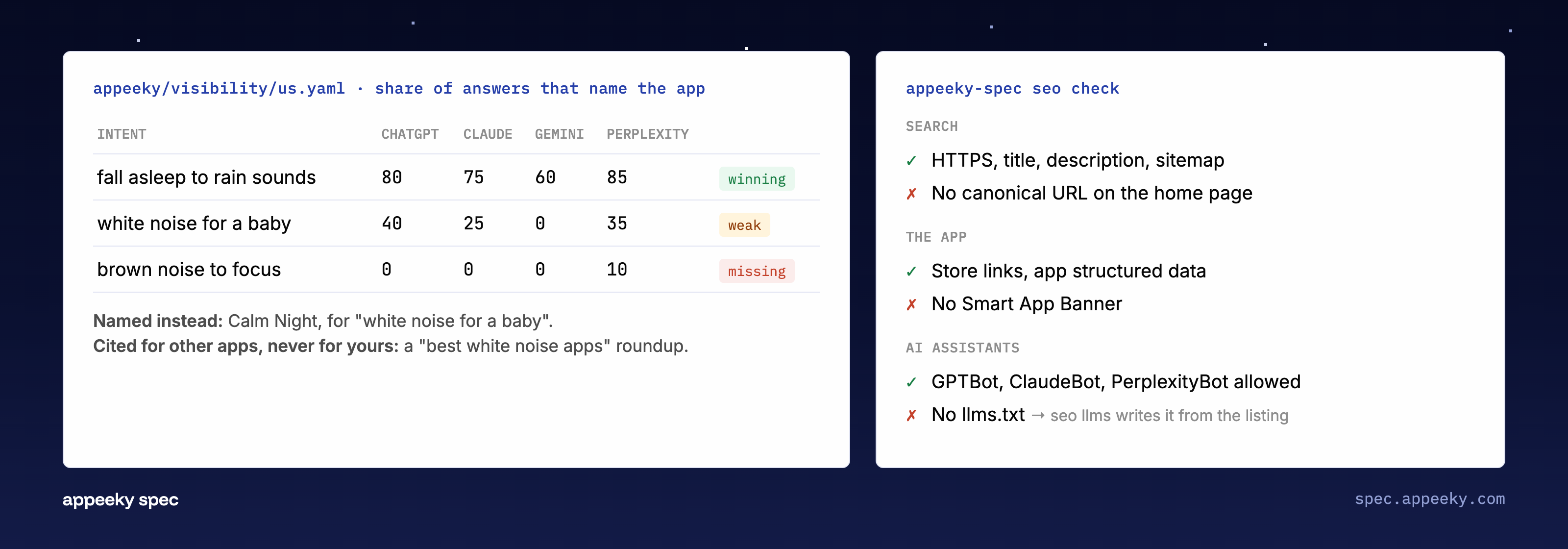
AI visibility. You write the questions people ask as intents and prompts in the spec. The assistants are asked on a schedule, per country, and the answers land in appeeky/visibility/: for each intent, the share of answers that name your app per assistant, who they name instead, and the pages they cite. A page that is cited for other apps and never for yours is marked as a gap. It runs through Appeeky or on your own OpenAI, Anthropic, Gemini and Perplexity keys.
It is measured like everything else. verify reads the share of answers that name the app before and after a push, so a description rewritten in the words people use gets a verdict in AI answers as well as in store search.
SEO. seo check reads the app's website the way a crawler does, with no key. It checks three things: search basics (title, canonical, sitemap), the app (store links, the Smart App Banner, structured data) and AI crawlers (whether GPTBot, ClaudeBot and PerplexityBot are allowed in, and whether there is an llms.txt). Each finding comes with its fix, and seo llms writes the llms.txt from your listing.
seo pull adds Google Search Console: clicks per day, queries, pages, and the queries sitting just below the top. Google positions and keyword volume come from your own DataForSEO account.
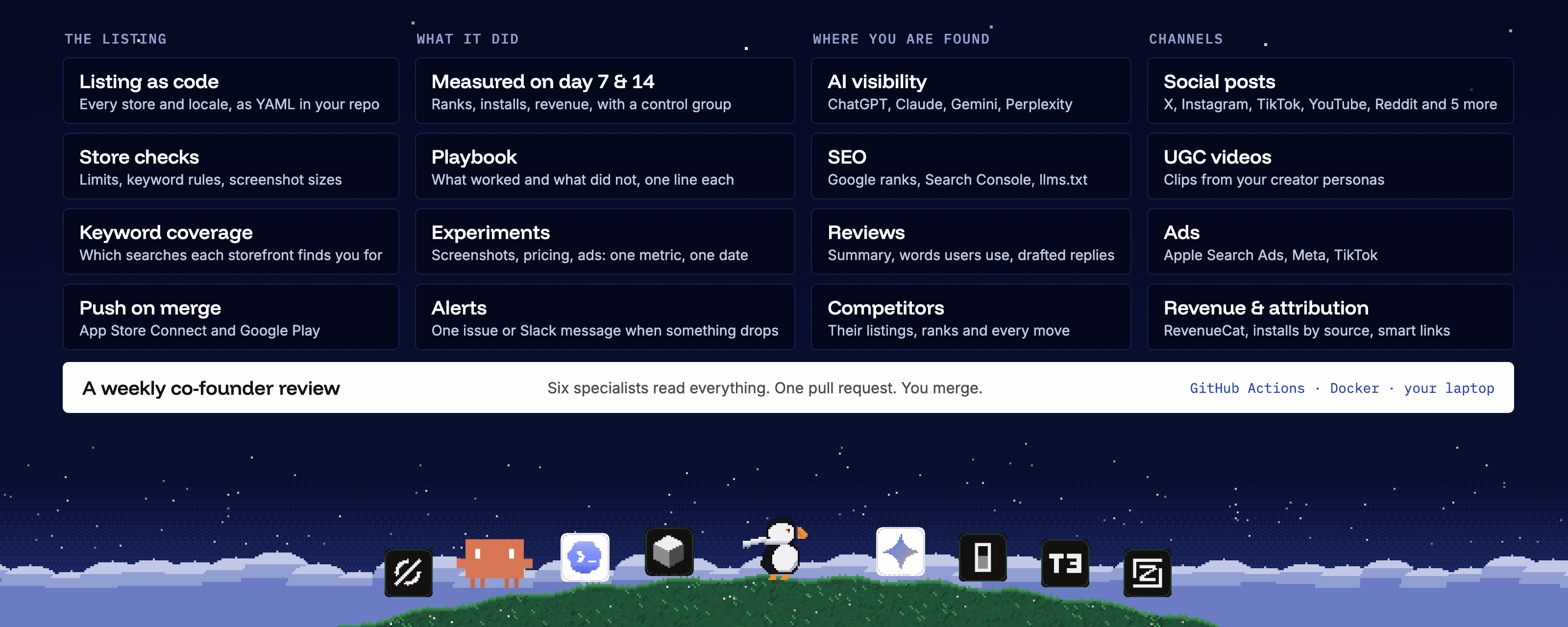
Posts, videos and ads go through the same loop
A listing change is one kind of growth change. The others use the same path: a file, a pull request, a merge.
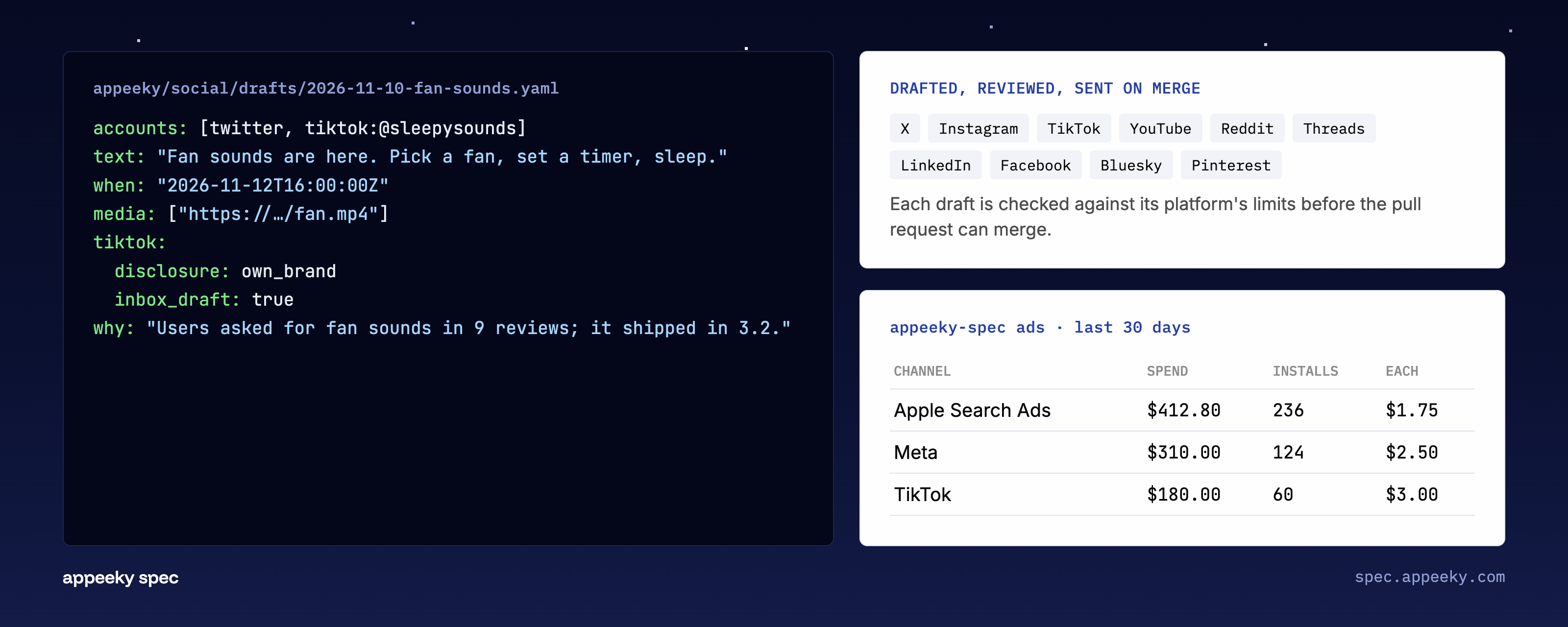
Social posts. A post is a YAML draft: which accounts, the text, when, the media, and why. social check fails the pull request if a draft would fail on its platform: text over the limit, a missing video, a disclosure rule on TikTok. After the merge it is sent to X, Instagram, TikTok, YouTube, Reddit, Threads, LinkedIn, Facebook, Bluesky or Pinterest. What each post did comes back into the folder: views, likes, comments, followers.
Comments come back too. The social specialist drafts replies to the unanswered ones, and you send them.
UGC videos. A video is a brief: the creator persona, the script, the scene, the caption. ugc generate --dry-run shows what it costs before anything is made. Clips are rendered after the merge, in Appeeky or on your own fal key.
Ads and revenue. ads prints spend, installs and cost per install for Apple Search Ads, Meta and TikTok. data pull writes App Store Connect, Google Play and RevenueCat numbers as CSV the agent can read. With attribution on, verify judges a listing change by what it is for: organic installs per day and the revenue they brought.
That last part matters. Ranks tell you whether more people find the app. Installs and revenue tell you whether it was worth it. A listing change and an ad change are judged over the same days, in the same file.
Experiments. Anything outside the listing, like new screenshots, a price or a UGC hook, is an experiment with one metric and a check date. It can get its own smart link, so its installs are counted to it.
It tells you when something needs you
The daily run writes the numbers. alerts reads them and speaks up when one needs a person: a target that fell ten places, a release that lost, a wave of one-star reviews, a competitor that put your keyword in its title, an assistant that stopped naming you, Search Console clicks down by a third, a check that is late.
Each alert is reported once, as a GitHub issue or a Slack message, with the numbers, the file they came from and the next step.
Once a week, one proposal
You can ask the agent for a change whenever you want: "we're launching in Germany next week", or "why did we drop for white noise?".
Or you can let it run on a schedule.
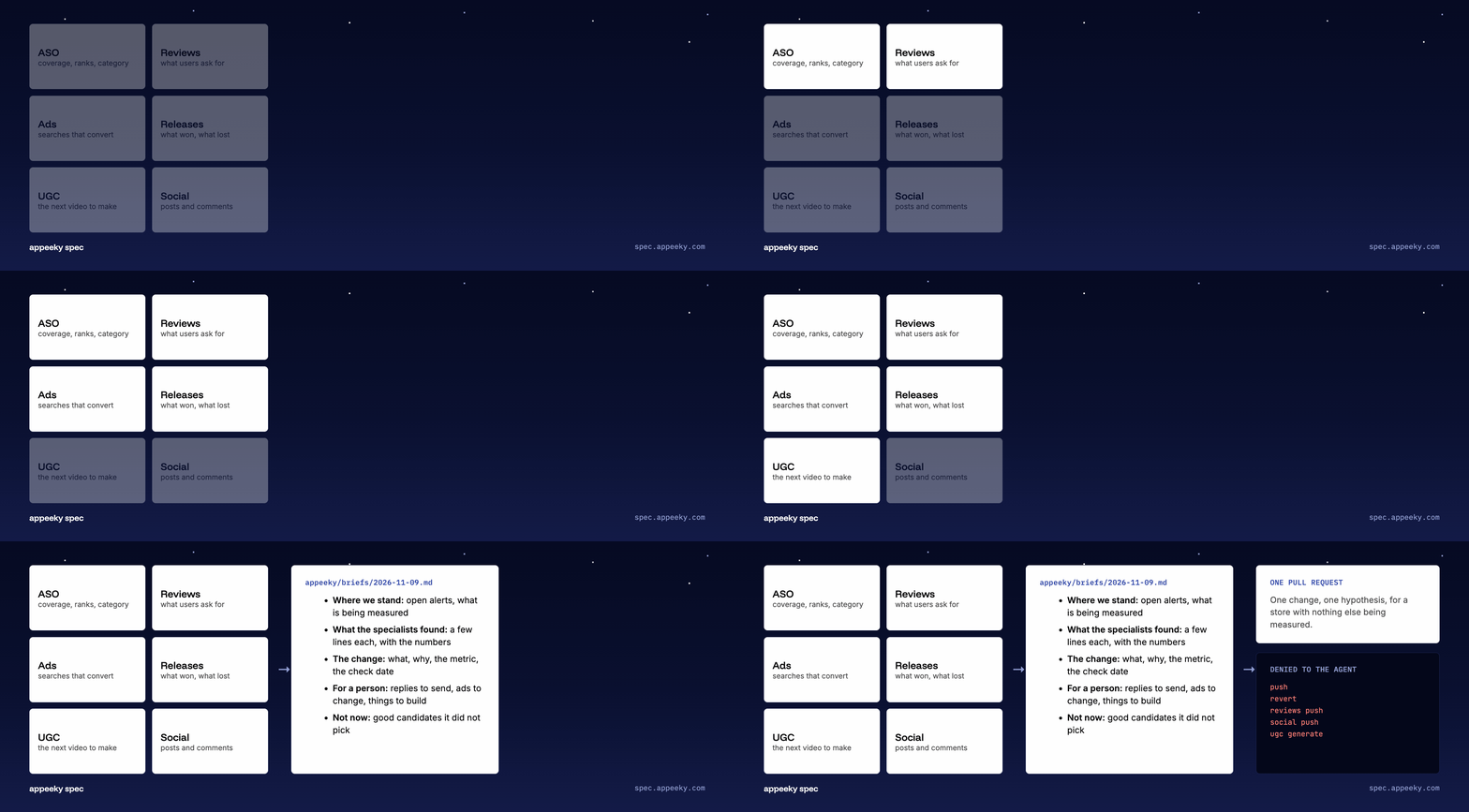
The weekly review starts six specialist subagents: ASO, reviews, ads, releases, UGC and social. They only read. Each comes back with findings and up to two candidates. The review then picks one change, with one hypothesis, for a store that has nothing else being measured, so its result means something.
It writes a brief, and it opens a pull request. The brief also lists what's for a person: replies to send, ads to adjust, things users keep asking for.
The agent is denied the commands that touch the outside world. It can't push, revert, send review replies or publish posts. It proposes. You merge.
What it doesn't do
It doesn't make an app people want. If the product has a problem, the reviews file will tell you, and no subtitle fixes it.
Search ranks are noisy, and two weeks is short. The control group and the noise check make a verdict more honest, but they don't make it certain. Treat "won" as evidence.
On the App Store, most listing fields only change with a new app version. The tool tells you which changes are blocked and why, but it can't change Apple's rules.
It's at 0.x. Commands and file formats can still change.
Try it
npx @appeeky/spec initnpx skills add appeeky/skillsThe first command sets up the folder. The second teaches your coding agent the workflow. It works with Claude Code, Codex, Cursor, Gemini CLI and others, with your own store keys on your machine or through an Appeeky connection.
The CLI is free on npm. It runs on GitHub Actions, on your own server with Docker, or on your laptop.
If you only try one thing, run coverage after init. It shows which of the searches you care about the store can actually find you for, and most listings have a gap there.